Free · Windows & macOS · No account needed
Live Gran Turismo 7 overlays for OBS
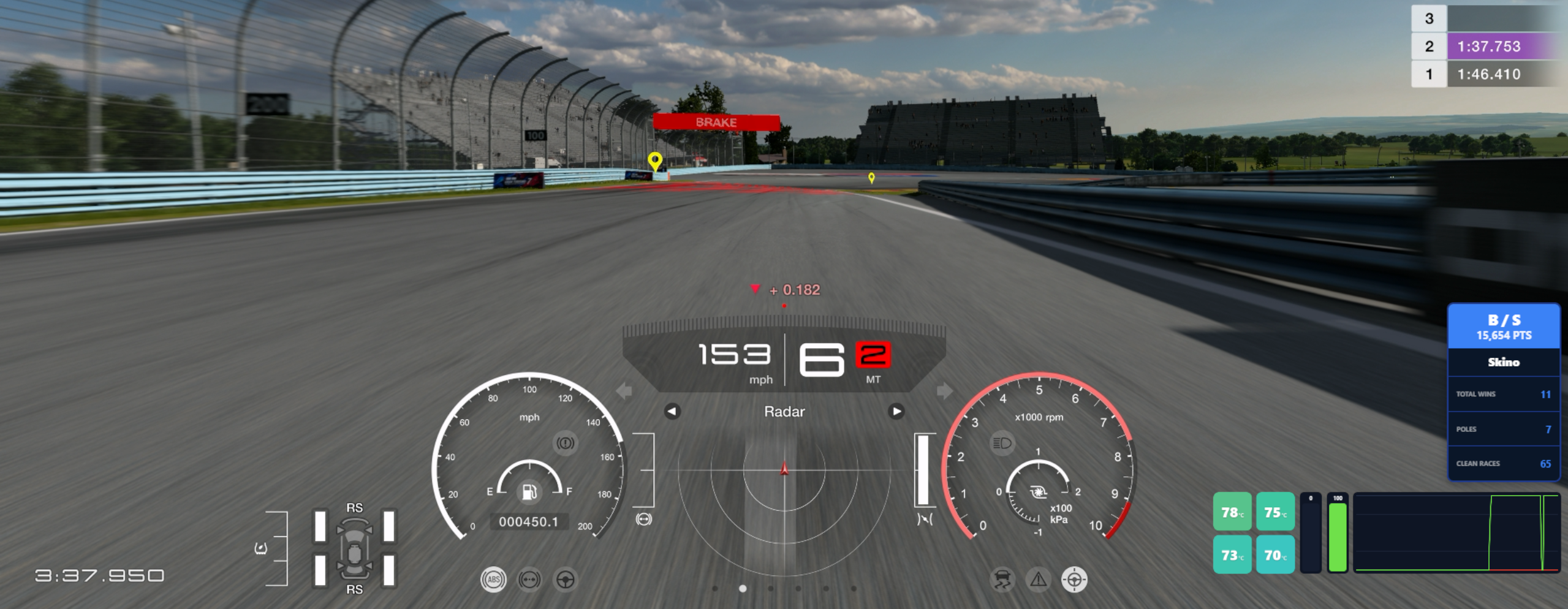
Deltas, tyre temperatures, pedal traces and your GridStats career numbers — laid out how you want them, running entirely on your own PC.
Released 25 September 2026
Windows will warn you about this download. Here's why, and what to click.
12
Widgets
Telemetry, career stats and your own images, more to come soon
60 Hz
Update rate
Fast enough to catch a momentary lock-up
ZERO
Telemetry Uploaded
Your driving data never leaves your PC
1
Browser Source
One URL in OBS, however many widgets you add
No Cost
FREE
No subscription, no adverts, no bundled software
∞
Overlays
Keep a race layout and a practice layout side by side
How it works
GT7 already broadcasts your telemetry on your home network. GSTA reads it and draws overlays from it.
No capture cards, no plugins, no scripts. The app runs on your PC and
serves overlays to OBS as a Browser source, so what you build appears
over your gameplay exactly as you arranged it.
Everything read from your console stays on your machine.
Twelve widgets, every one of them movable, resizable and recolourable until it looks like yours rather than mine.
Build against a screenshot of your own race view, so you can see where each widget lands against GT7's own HUD before you go near OBS.
From your console
Lap delta against your previous or best lap, matched by track position so it updates continuously rather than at sector lines. Tyre temperatures shading from cold blue to hot red. A scrolling accelerator and brake trace. Individual pedal bars.
From GridStats
Your DR and SR on the wide HUD bar, a rank progress dial, a career stats card with the numbers you choose, and a slim progress bar. Needs a free API key — the telemetry widgets don't.
Your own images
Drop in a logo, a sponsor bar, a team badge or anything else you want on the stream, and position it alongside everything else.
Built the way you'd expect a design tool to work
Drag, snap, resize, recolour. Changes push straight through to OBS as you make them.
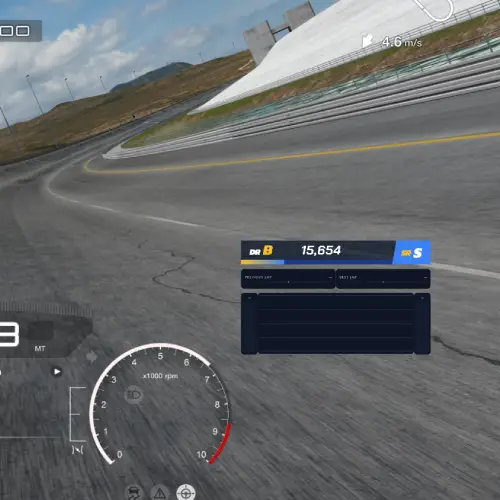
Your race view behind it
Upload your own screenshot and place widgets clear of the HUD
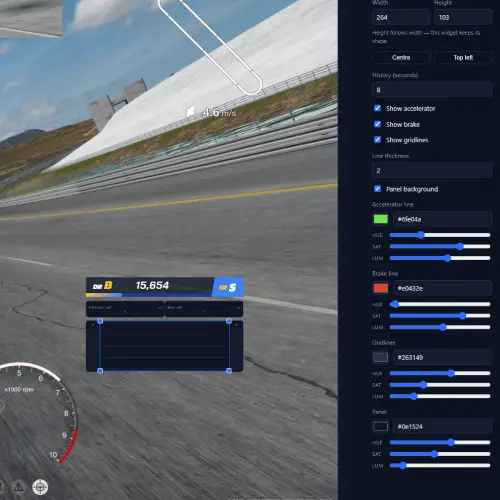
Every colour, yours
Pickers and sliders on every element, live as you drag
Read this before you install
Windows will warn you about this download
GSTA isn't code signed, so Windows shows a blue "Windows protected your PC" screen when you run the installer. That isn't a virus warning — it means Windows doesn't recognise the publisher.
Clearing it means buying a code signing certificate, a few hundred a year, every year. GSTA is free and doesn't earn anything, so it stays unsigned for now.
To install anyway: click More info, then Run anyway.
If you'd rather not take my word for it, run the installer through VirusTotal, check the hash below, or build it yourself from source.
SHA-256
d5b6515e71060f29d1059985b45c5530518d4653715187434faac2f2452c4a10
Verify it with
certutil -hashfile GSTA-Setup-0.10.0.exe SHA256
And why it asks for administrator rights
One reason: a Windows Firewall rule. Your console replies to GSTA over UDP port 33740, and Windows blocks that silently by default — the app would appear to run while receiving nothing at all. The rule covers that one port, from devices on your own network only, and is removed when you uninstall. Nothing else on your system is changed.
Getting started
Four steps from download to something on your stream.
01
Install and open
It'll tell you no PlayStation is set yet.
02
Find your console
One button asks every device on your network. GT7 has to be running and on track to answer.
03
Build an overlay
Upload your race view, drag widgets onto it, recolour them. Or use simulator mode with the console off.
04
Add it to OBS
Copy the URL, add a Browser source, paste, match the size. Done.
What you need
- Windows 10 or 11, or a Mac running a recent version of macOS
- OBS Studio
- A PlayStation running Gran Turismo 7, on the same network as your computer
That's it. No account, no key, no sign-in for any of the telemetry widgets.
If you want the career stats
The GridStats widgets need a free API key. Register, generate a key on your account page, and paste it into the app once.
Your key is encrypted against your user account, never written into an overlay URL, and only ever sent here — so sharing or capturing an overlay can't expose it.
What's new in 0.10.0
The questions that come up most
Nothing appears in OBS
First: is GT7 actually on track? It only broadcasts while you're driving — menus, replays and loading screens send nothing. After that, check the Browser source size matches the size shown in the app, then run the diagnostics panel, which checks the network, the port, the firewall and what your console is sending, and tells you which one is wrong.
The app runs but never receives anything
Almost always the firewall. Outbound requests still leave when a program is blocked, so GT7 receives them and replies into nothing. The symptom is total silence with no error. Run diagnostics and use Allow through firewall.
It says port 33740 is already in use
Only one program can receive telemetry on that port. Close any other GT7 telemetry tool, and check GSTA isn't already running in the system tray.
I closed the window and my overlay kept working
That's intended — GSTA carries on in the tray so your stream doesn't drop when you tidy your desktop. Right-click the tray icon to quit properly, or turn the behaviour off in Settings.
The delta just shows a dash
It needs a reference lap. Previous-lap appears after you complete one lap, best-lap after two.
I stream at 4K
Set the overlay size to 3840 × 2160, or upload a 4K screenshot as your race view and press Match size to image.
Does it work with GT Sport, or on PC sims?
GSTA reads the Gran Turismo 7 telemetry format specifically. Other titles broadcast differently and aren't supported.
Put your laps on the stream
Free, runs on your own machine, and takes about two minutes to set up.